









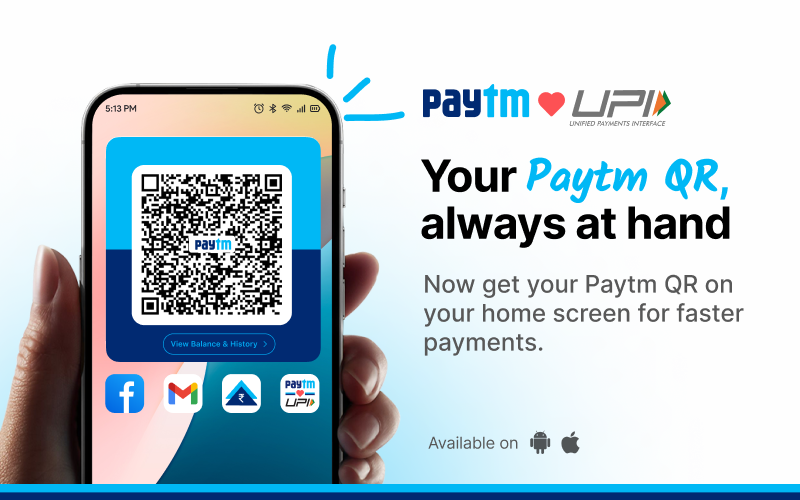
Paytm has launched the ‘Receive Money QR Widget’ for Android devices, following positive feedback from iOS users. This new feature allows users to accept payments directly from their home screen, without the need to open the Paytm app.
The widget is designed to help influencers, shopkeepers, freelancers, and small businesses collect payments quickly and easily. By adding the widget to their home screen, users can instantly display their QR code for payments.
In addition to the widget, Paytm has introduced a coin-drop sound to notify users of payments received. This sound provides an immediate, real-time alert whenever a payment is made, ensuring that users can track their transactions efficiently.
Here’s a simple step-by-step guide on how to use the ‘Paytm QR Widget’ for receiving money on Android:
- Open the Paytm app.
- Tap on your profile icon in the top left to open the flyout menu.
- Tap on the “Add QR to Homescreen” button below your QR code.
- Upon confirming, the QR widget will be added to your phone’s home screen.
- Once you close the Paytm app, you will see the QR widget on your home screen.
- You can now simply show the QR widget to receive money instantly, without needing to open the Paytm app the next time you need to receive payments.
- You will hear a coin-drop notification sound whenever someone makes a payment.
Paytm’s new feature is part of its ongoing efforts to simplify mobile payments. The company also offers features like UPI Lite for small transactions, RuPay Credit Card linking on UPI, and international UPI payments in countries like the UAE, Singapore, and Nepal.